
How to add AI to a SaaS product is a staffing question as much as a technical one. The model call is the easy part. The work sits around it: data access, evaluation, security review, and release discipline. This guide shows how CTOs scope a first AI feature, decide who builds it, and add nearshore engineers without pausing the roadmap.
How to Add AI to a SaaS Product in Five Steps
Treat your first AI feature like any other product bet. Here is how to add AI to a SaaS product in five steps that keep scope narrow and success measurable:
- Pick one user problem. Choose a task users already do and dislike, such as summarizing long threads or classifying support tickets. Define a measurable outcome, such as time saved per task.
- Choose the build path. Match the approach to your data and your risk tolerance, using the table below.
- Prepare data and permissions. Decide which records the model can see. Apply the access rules your product already enforces.
- Build the evaluation set first. Collect real examples with the answers you expect. You will use them before launch and after every change.
- Ship behind a flag. Release to a small group, watch quality and latency, and keep a manual fallback in place.
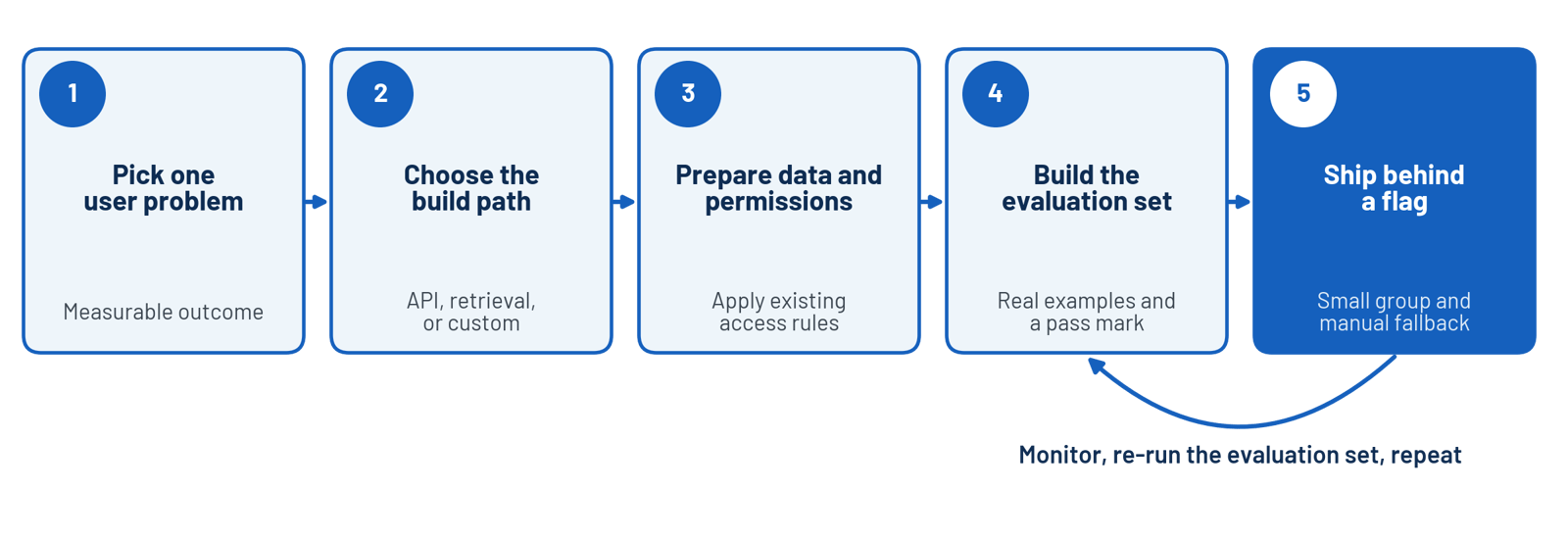
The five-step path to a first AI feature, with a loop back to the evaluation set after launch.
Three build paths cover most SaaS features. Start with the simplest one that meets the requirement.
| Build path | What it involves | Fits when | Main risk |
| Hosted model API | Call a provider's model with your prompt and context | The task needs general language skills | Provider data terms and output variance |
| Retrieval over your data | Fetch your own records and pass them to the model | Answers must reflect customer or product data | Permission leaks and stale data |
| Custom or fine-tuned model | Train or adapt a model on your data | You hold unique data and see a clear quality gap | Longer timeline and ongoing maintenance |
Example: ticket summarization. A support platform wants agents to see a short summary at the top of every long ticket. The team picks a hosted model API, sends only the ticket thread, and builds an evaluation set from real tickets that agents have already summarized by hand. Agents rate each summary during a pilot, and the team launches to everyone once the pass mark holds across a full week of tickets.
How to Add AI to a SaaS Product: Which Engineers You Need
Most first AI features are software engineering work. You need engineers who build reliable APIs, handle data access, write tests, and ship safely.
Your team probably uses these tools already. Stack Overflow's 2025 Developer Survey found that 84% of developers use or plan to use AI tools in their workflow. Familiarity with the tools no longer sets candidates apart. Engineering judgment does.
- Senior backend engineer. Owns the integration, data access, and failure handling.
- Data or ML engineer. Needed when you build retrieval pipelines, tune models, or run your own evaluation tooling.
- Front-end engineer. Designs how uncertain output appears to users, including loading states, citations, and corrections.
- QA engineer. Builds regression sets for model behavior and tests edge cases.
Add ML research talent only if your roadmap calls for custom models. A hosted API with solid engineering covers most first releases.
Need senior engineers for an AI roadmap without a long search? Bluelight places vetted nearshore engineers within 7 to 14 business days. Expand Your Team →
Evaluate Before You Ship
Model output varies, so you test it differently. Build an evaluation set: a fixed list of inputs with expected qualities, scored by rules, by humans, or by both. Run it before every release and after every prompt or model change.
A framework keeps the review lightweight. The NIST AI Risk Management Framework organizes AI risk work into four functions: govern, map, measure, and manage. You can turn each function into one question for your team.
Use these four questions as a pre-launch review for any AI feature.
| NIST function | Question for your team |
| Govern | Who owns this feature's risk and signs off on launch? |
| Map | Where does the model touch customer data, and who can see its output? |
| Measure | What does the evaluation set score, and what pass mark blocks release? |
| Manage | How do you monitor quality, roll back, and handle user reports? |
Build, Buy, or Call an API: A Decision Rule
Every AI feature raises the same question: do you build it, buy a finished product, or call a model through an API? Four questions settle most cases.
- Is the task general or specific to your data? General tasks, such as drafting or summarizing, fit a hosted model. Tasks that depend on proprietary data call for retrieval or a custom model.
- Does the feature differentiate your product? If customers choose you because of it, own more of the stack. If it is table stakes, buy it or call an API.
- How sensitive is the data? Regulated or contractual data narrows your options and raises the bar for any provider you use.
- Who maintains it in a year? A custom model needs people to evaluate, retrain, and monitor it. If you cannot staff that work, choose a simpler path.
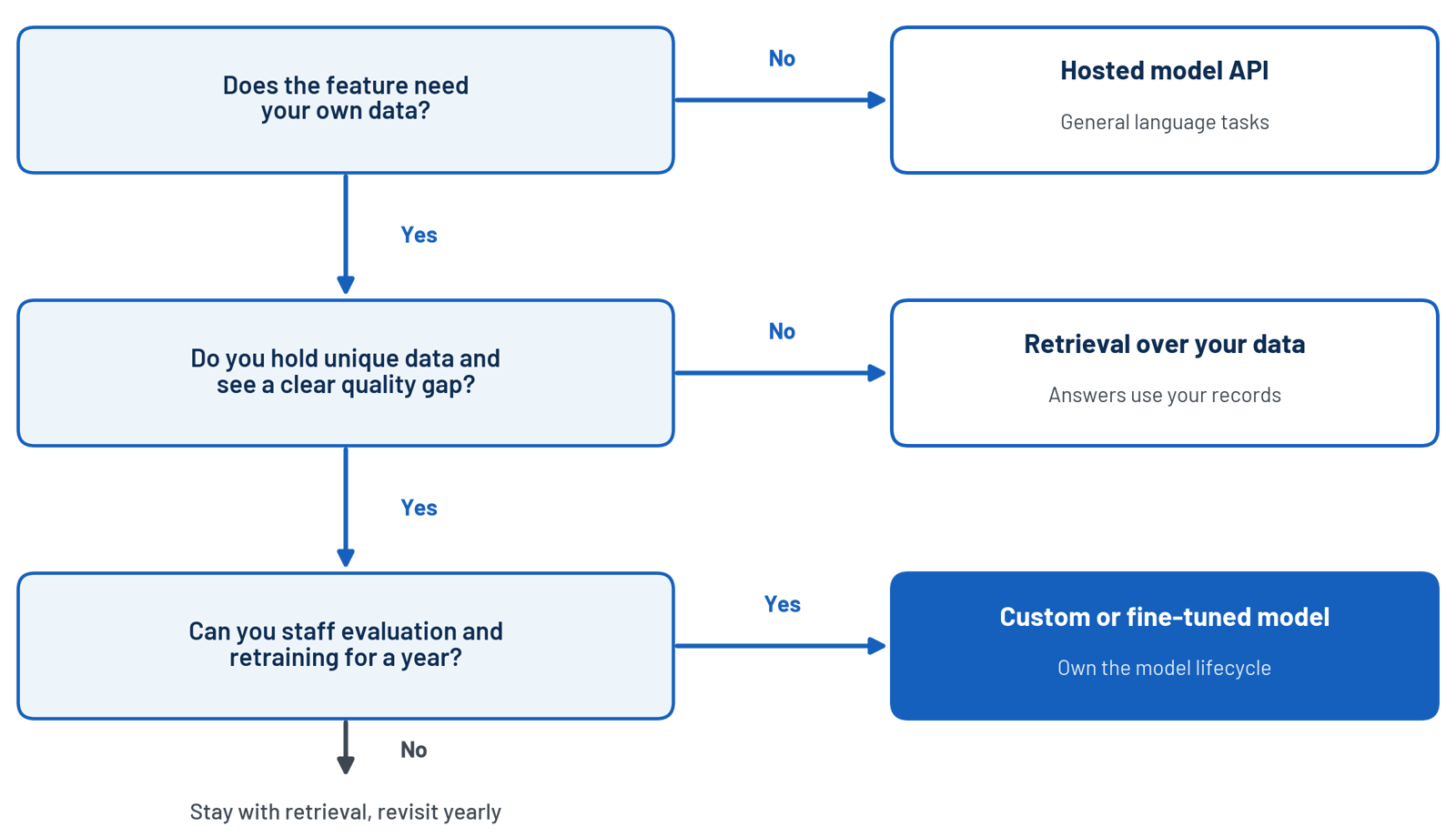
A decision path for choosing between a hosted API, retrieval over your data, and a custom model.
Revisit the decision each year. Models improve, provider terms change, and a feature that needed a custom model last year may run well on an API today.
Staffing shapes the answer more than most CTOs expect. A team with two strong backend engineers and an open sprint can ship an API-based feature quickly. A team that wants retrieval over private data needs data engineering depth first, and that is where added nearshore engineers close the gap soonest.
Security, Privacy, and Data Boundaries
AI features move data to new places. Treat them like any other third-party integration.
- Read the provider's data retention and training terms before you send customer data.
- Send only the fields the task needs, and redact personal data before it reaches a prompt.
- Apply your existing permission model to retrieved content, so users only see what they could already see.
- Log prompts and outputs under the same access controls as production data.
- Test for prompt injection, where user-supplied text tries to override your instructions.
Compliance reviews move faster when your engineering partner already works under strong controls. Bluelight is SOC 2 compliant, and its engineers work inside your repositories and access rules.
How a Nearshore Engineering Team Fits an AI Roadmap
AI features need fast iteration. You adjust a prompt, run the evaluation set, read the failures, and adjust again. That loop slows down when questions wait overnight.
In Bluelight's benchmark, a nearshore team finished a change request 84% faster than an offshore team, since every question about a prompt or an evaluation failure got an answer within the working day.
Embedded engineers add capacity without changing who owns the roadmap. Your product leaders keep the priorities, and the added engineers join the same sprints and reviews. AI work at Bluelight runs inside staff augmentation and dedicated team engagements, as described on the custom AI solutions page.
If you are deciding between adding engineers and hiring a permanent AI team, the staff augmentation vs full-time hiring guide lays out the decision.
Monitor the Feature After Launch
AI features degrade quietly. Providers update models, user inputs shift, and your own data changes. A release that passed evaluation in the spring can slip by summer without a single code change.
- Quality drift. Re-run the evaluation set on a schedule, and alert when scores fall below the pass mark.
- User feedback. Add a one-click rating on each output. Review low ratings weekly and add them to the evaluation set.
- Latency and errors. Track response time, timeout rate, and provider errors on the same dashboards as the rest of your product.
- Model changes. Pin model versions where the provider allows it, and test every version change before it reaches users.
- Usage. Watch request volume against provider limits so growth does not cause outages.
Assign an owner to each signal. An AI feature with no named owner after launch becomes tomorrow's incident. The engineers who built the feature are the natural owners, because they already know the evaluation set and the failure modes.
Mistakes That Stall a First AI Feature
- Starting with the model instead of the problem. Pick the user task first, then choose the approach.
- Skipping evaluation. Without a test set, every change is a guess and regressions go unseen.
- Shipping without a fallback. When the model fails or times out, users need a manual path.
- Ignoring latency and usage limits. Slow responses and rate limits shape the experience as much as accuracy does.
- Building in a silo. An AI group disconnected from the product team ships demos that never reach production.
Frequently Asked Questions
How do you add AI to a SaaS product?
Pick one narrow user problem, choose the simplest build path that works, prepare data and permissions, build an evaluation set, and release behind a feature flag. Monitor quality and keep a manual fallback.
Do you need ML engineers to add AI features?
Not for most first releases. A hosted model API plus solid backend, front-end, and QA engineering covers many features. Add data or ML engineers when you build retrieval pipelines or custom models.
How long does it take to add AI to a SaaS product?
A narrow feature on a hosted model can ship within a few sprints. Retrieval over private data or a custom model takes longer, mainly because of data preparation and evaluation work.
How do you keep customer data safe when integrating AI?
Send only the fields the task requires, redact personal data, enforce your existing permissions on retrieved content, and review the provider's retention terms. Log prompts and outputs under production access controls.
Should you build or buy AI features?
Call a hosted model when the task is general, such as summarization. Build deeper when your data or workflow creates an advantage a general model cannot match. Many teams start with an API and build more later.
How can nearshore engineers help with an AI roadmap?
They add senior engineering capacity in your time zone, so prompt, evaluation, and release cycles stay fast. You keep ownership of product decisions while the added engineers join your sprints.
Key Takeaways
- Start with one narrow user problem and a measurable outcome, not with a model.
- Most first AI features are software engineering work: integration, data access, testing, and safe releases.
- Build the evaluation set before the interface, and run it before every release and every prompt change.
- Apply your existing permissions and data controls to everything the model sees and returns.
- Nearshore engineers add capacity in your time zone while your product team keeps ownership of priorities.
More cost-effective than hiring in-house, with Nearshore Boost, our nearshore software development service, you can ensure your business stays competitive with an expanded team and a bigger global presence, you can be flexible as you respond to your customers’ needs.
Learn more about our services by booking a free consultation with us today!


